TABLE OF CONTENTS
- Summary
- Sub-Menu Enhancement
- Bedrock: Navigation Accessibility Enhancement
- Banner additions without restart
- Social Media Archive Widget – Configurable Title Enhancement
- Social Media Archive Widget – Configurable Footer Text Enhancement
- Blog Widget Enhancement – Grid View Layout Addition
- Security & Modernization Update – Replacement of Moment.js in Digital Agent (DA)
- Web Content Editor – Image & Link Copy-Paste Fix Enhancement
Summary
Release notes are essential documents that provide clients with detailed insights into the changes, enhancements, and updates applied to the Digital Agent platform. They serve as a crucial communication tool, informing clients about new functionalities, improvements, and other modifications that may be available to them.
Purpose:
The primary purpose of release notes is to ensure transparency and keep clients informed about the continuous development and enhancement of the Digital Agent platform. They help clients understand the value of the updates and how they might benefit from new features and improvements.
Sub-Menu Enhancement
The Digital Agent (DA) menu structure has been enhanced to support up to four (4) navigation levels, expanding from the previous two-level limitation; to enable deeper navigation hierarchies while maintaining current configuration behavior and avoiding disruption to existing implementations.

Final Design & UI Behavior
Layout Model
Menus are displayed in a staggered “waterfall” layout:
If sufficient screen space exists to the right:
Submenus cascade to the right
If insufficient space on the left:
Submenus cascade to the left
This ensures responsive behavior based on available viewport space.
Visual & Interaction Updates
Only up/down chevrons are used for expand/collapse behavior
(No sideways arrows)Submenus do not include additional white space between levels
Menu items with submenus include a background highlighter box
Default selected item includes:
Grey background highlight
Active Main Menu link:
Colored per approved mockup
Font color for all menu and submenu labels:
#000000
Out of Scope
Hover state for submenu items:
No additional highlight or background color change
Active Main Submenu link:
No visual indicator (unchanged from current behavior)
No structural changes to DA settings configuration
Environment
Applicable to Digital Agent navigation
No changes required to configuration workflow
Default Styling Update (Bedrock)
A default styling configuration has been applied to the customer’s Bedrock environment that is different from the previous version. Clients may need to adjust the CSS if the default styling was previously relied upon. Below is the CSS setting that may need to be introduced. The colour codes should be changed to align with the desired branding.
/*5.18 styling updates*/
.nav-pages .active a {
    color: #fff !important;
}

/*Dropdown menu text colour - dropdown expanded */
.nav-bar .regular-nav .nav-pages li:hover .dropdown-content a,
.nav-bar .regular-nav .nav-pages li:hover a,
.nav-bar .regular-nav .nav-pages li.active:hover a {
  color: #fff;
}

/*Active menu label background colour - dropdown expanded */
.nav-menu.active-trail > .dropdown > .dropbtn > .nav-menu-label {
    background-color: #012d3c !important;
    color: #fff;
}
Custom Theme Clients
This feature is currently enabled in UAT for clients using a custom theme. However, it will be disabled in Production. Legacy themes already have styling built-in and do not support Virtual Theme functionality or website-level styling.
Clients who would like to implement this enhancement within their theme will need to engage their Sales representative to review requirements for layout formatting needs.
Please contact your Sales representative if you are interested in enabling this feature.
Bedrock: Navigation Accessibility Enhancement
Overview
For Bedrock clients, to improve accessibility and ensure compliance with WCAG 2.1 Level AA standards, we have implemented programmatic identification of the currently active navigation item using the aria-current attribute. This enhancement ensures that assistive technologies, including screen readers, can accurately identify and announce the user’s current location within the site navigation.
This update supports improved usability for users relying on assistive technologies and aligns with AODA requirements for Bedrock clients.
What’s Included in This Release
1. Programmatic Indication of Current Page
The active navigation link now dynamically includes:
aria-current="page"The attribute is applied only to the currently active <a> element.
The active state is centrally determined using the recursive menu logic.
On the first load of the Home page, the Home navigation item is automatically set as the current page.
This ensures that screen readers announce contextual information such as:
“Home, current page”
“Step 2 of 4, current step” (where applicable)
2. Visual Indication
The active navigation item continues to be visually distinguishable (e.g., styling for active state).
This ensures both sighted users and assistive technology users can identify the current page.
3. Multi-Level Navigation Support
The enhancement supports all navigation structures, including:
Pages under a single menu label
Pages nested under multiple menu labels
Deeply recursive navigation structures
All tested use cases have passed validation.
Accessibility Compliance
This update addresses the following WCAG 2.1 Level AA Success Criteria:
2.4.4 – Link Purpose (In Context)
Ensures navigation links are meaningful and clearly identifiable.4.1.2 – Name, Role, Value
Ensures states and properties (such as current page) are programmatically determinable.
Technical Summary
Refactored recursive navigation rendering logic.
Centralized active page detection using themeUtil.isPageSelected(...).
Dynamically applies aria-current="page" only to the active link.
Ensured the ARIA attribute is rendered directly on the <a> element.
Verified correct DOM behavior and dynamic updates during navigation.
Impact
No configuration changes required.
No impact on existing navigation structure.
Automatically applies to Bedrock navigation menus upon page navigation.
Banner additions without restart
Overview
This release introduces a new banner management deployment process that enables adding, replacing, or removing image/video banners without requiring a restart of the environment. The process to submit requests does not change.
Key Objectives
Eliminate restart requirement for banner updates
Ensure banners display correctly across all Digital Agent views:Logged-in users
Logged-out users (if site-configured)
Automate deployment
Standardize banner storage and configuration updates
Simplify tenant-based deployment process
Supported Operations
Adding New Banners
Places new banner files in the options directory
Banner appears immediately after deployment
Replacing Existing Banners
Replaces existing banner files in directory
Changes reflect instantly after deployment
Removing Banners
Updates environment to remove references
Files are not deleted from directory
Banner no longer appears in UI to be added New
No restart required
Benefits Delivered
Zero-downtime banner updates
Operational efficiency improvement
Reduced deployment complexity
Tenant-aware automation
Cleaner architecture (no DB dependency for banner names)
Social Media Archive Widget – Configurable Title Enhancement
Availability: Applicable to all clients using the Social Media Archive widget
Impact: No compliance workflow changes required
What’s New
We have enhanced the Social Media Archive widget to support configurable titles by language at the client level.
Previously, the widget title was not editable and could not be modified through the UI because it did not pass through a compliance workflow.
With this update, clients can now define the widget title per supported language via configuration — without impacting existing compliance processes.
Previous Behavior
The Social Media Archive widget title was fixed.
The title could not be edited in the UI.
Changes required technical intervention and were not configurable at the client level.
New Behavior
The widget title is now:
Configurable at the client level
Defined per language
Automatically displayed based on the visitor’s selected language
Not editable by end users (remains controlled configuration)
No compliance workflow changes were introduced as part of this enhancement.
Supported Languages
The following languages are supported for title configuration:
* For languages other than English and French, the default value is “Social Media.”
Translations may be provided if localized wording is preferred.
How It Works
Logged-In View (Page Authoring)
When adding the Social Media Archive widget to a page:
The widget title automatically populates based on the configured language value.
Visitor View
The widget title dynamically aligns with the defined value for the selected site language.
If no custom value is configured, the default language value will be used.
Important Notes
This is a client-level configuration.
The title is not editable by end users.
No impact to compliance workflow.
No changes required to portal-ext or hotfix processes.
Footer configuration changes (if applicable) are handled separately.
Client Impact
Enables multilingual branding consistency.
Supports roadmap requirements for flexibility and consistency.
Maintains current behavior for clients (English-only configuration).
No disruption to existing implementations unless configuration changes are requested.
Summary
This enhancement provides greater flexibility for multilingual clients while preserving compliance boundaries and current production behavior.
Clients wishing to customize their Social Media Archive widget title per language may contact their Veriday representative to request configuration updates.
Social Media Archive Widget – Configurable Footer Text Enhancement
What’s New
We have enhanced the Social Media Archive widget to allow the footer text to be configured at the client level and by language.
Previously, the footer message was hard-coded and could not be modified. With this update, clients can now define their own footer text without requiring UI edits or compliance workflow changes.
Previous Behavior
Footer text was hard-coded in the widget.
It could not be edited through the UI.
Any change required a code update.
No language-based customization was available.
New Behavior
The footer text is now:
Configurable per client
Configurable per supported language
Stored in configuration (DA_Setting)
Automatically displayed based on the website’s selected language
Not editable by end users (client-level configuration only)
This enhancement provides flexibility while preserving compliance boundaries.
Supported Languages
Footer text can be configured for the following languages:
* For languages other than English and French, the default value is English. Localized translations can be provided if desired.
How It Works
Logged-In View (Page Authoring)
When the Social Media Archive widget is added to a page:
The footer text is automatically pulled from the client’s configuration.
The displayed value matches the current language of the site.
Visitor View
The footer text dynamically reflects the configured value for the selected site language.
If a language-specific value is not configured, the system falls back to the default language configuration.
Important Notes
This is a client-level configuration.
End users cannot edit the footer text through the UI.
No portal-ext changes or compliance workflow updates are required.
Existing clients (e.g., English-only implementations) will continue to see current behavior unless configuration changes are requested.
Language support depends on the languages enabled for the specific client environment.
Client Benefits
Improved multilingual flexibility
Client-specific branding and messaging
No code changes required for updates
No compliance workflow impact
Controlled and centralized configuration
Summary
This enhancement modernizes the Social Media Archive widget by replacing hard-coded footer text with a configurable, multilingual solution. Clients can now align footer messaging with their brand and language strategy while maintaining governance controls.
Blog Widget Enhancement – Grid View Layout Addition
What’s New
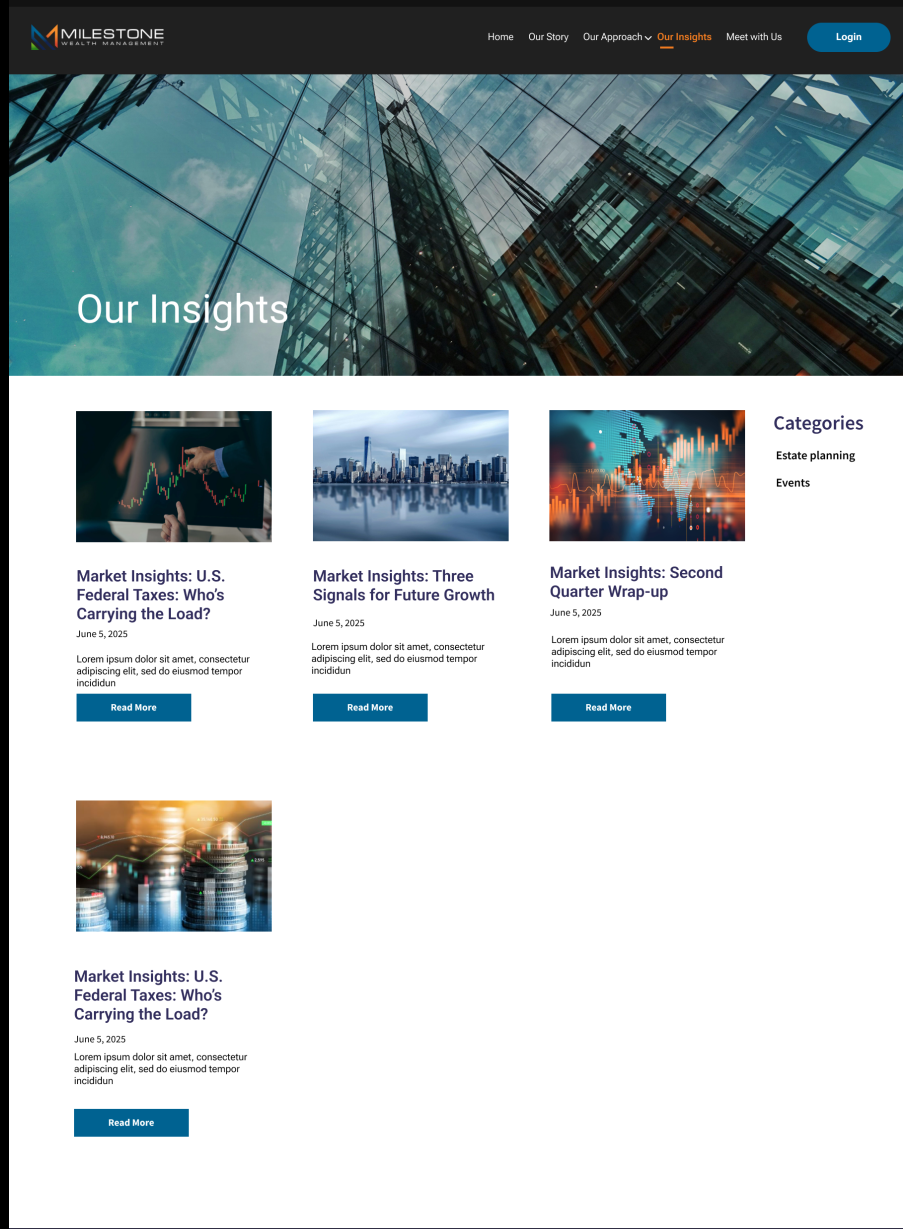
We have enhanced the Blog widget to introduce a modern Grid View layout, alongside the existing List View.
This update improves visual presentation, layout flexibility, and overall user experience while maintaining accessibility compliance (AODA).
Default Styling Update (Bedrock)
A default styling configuration has been applied to the customer’s Bedrock environment.
While this establishes a consistent baseline design, additional refinements may be required to fully align with your brand standards. These adjustments can be implemented using custom CSS through the Virtual Theme configuration.
Customer Theme Clients - Custom Grid View Availability
The custom Grid View feature is not enabled by default.
Clients who would like to implement this enhanced layout option within their theme will need to engage their Sales representative to review requirements for layout formatting needs.
Please contact your Sales representative if you are interested in enabling this feature.
Key Enhancements
Grid View Option Added
Blog pages now support both:
List View (default)
Grid View

Users with appropriate access can switch between layouts via the Blog options menu.
The List View remains the default selection to preserve existing behavior.
Improved Blog Presentation
Both views support:
Featured images
Blog titles
Blog excerpts
“Read More” call-to-action
Blog categories
Blog archive navigation
Layout behavior has been refined for:
Desktop
Mobile devices

Accessibility Compliance
AODA compliance verified for both Grid and List views.
Accessibility standards maintained across layouts.
Keyboard and screen reader behavior unaffected.
Multilingual Support
French translations verified and functioning as expected.
Language behavior aligns with browser locale and site configuration.
No additional configuration required for multilingual environments.
Permission-Based Control
The Grid View feature can be controlled via configuration to determine which clients have access to it.
UAT environments: Enabled for validation.
Production: Controlled per client configuration.
This ensures feature rollout can be managed without impacting clients who do not require Grid View.
Expected Behavior
Blog Page
Edit option is available (based on permissions).
List View is selected by default.
Users can toggle between List and Grid views.
Blogs render correctly in both layouts.
Categories and archive filters function in both views.
Mobile View
Grid and List layouts render responsively.
Layout optimized for smaller screen sizes.
No accessibility regressions.
Client Benefits
Modernized blog presentation
Improved visual layout flexibility
Better content engagement
Controlled rollout via configuration
Maintained accessibility compliance
No disruption to existing default behavior
Summary
The Blog widget now supports a configurable Grid View layout while retaining List View as the default display option. This enhancement improves presentation and flexibility without impacting accessibility, multilingual behavior, or existing client configurations.
Security & Modernization Update – Replacement of Moment.js in Digital Agent (DA)
What’s Changed
As part of our ongoing security and modernization efforts, we have replaced the legacy Moment.js date/time library across Digital Agent (DA).
Moment.js has been officially classified as a legacy library and is no longer actively maintained. To mitigate long-term security, stability, and maintenance risks, we evaluated and implemented a modern replacement.
New Implementation
We have successfully migrated from Moment.js to another library framework that is
Actively maintained
Lightweight and modern
Security-conscious
Compatible with existing date formatting standards
What This Means for Clients
There are no visible or functional changes to date handling within the application.
All:
Date formats
Time formats
Expiry logic
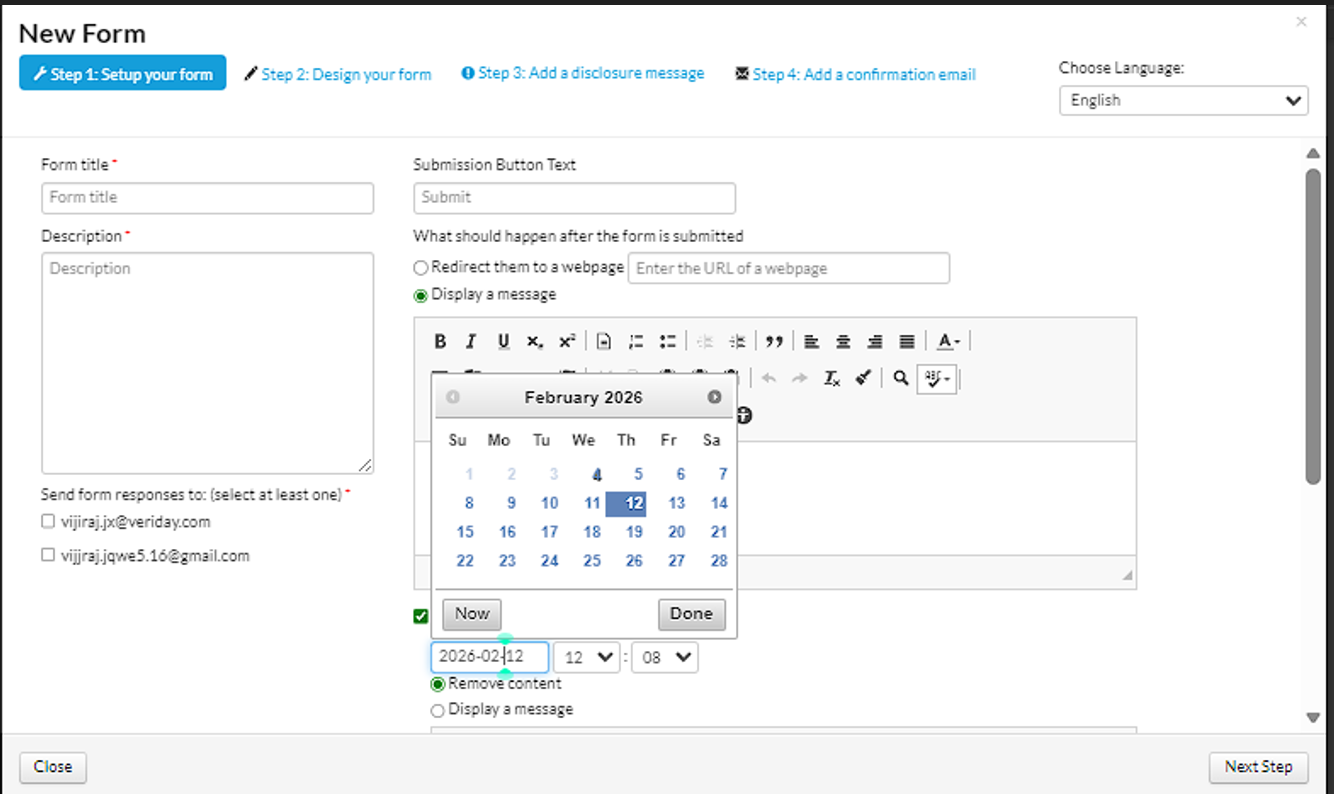
Calendar displays
Date pickers
Language translations remain exactly the same as before.
The migration was completed in a way that ensures full backward compatibility.
Security & Maintenance Benefits
This update provides:
Reduced exposure to legacy library risks
Improved long-term maintainability
Reduced dependency on unmaintained software
Smaller frontend footprint (improved performance efficiency)
Cleaner codebase and removal of unused legacy calendar scripts
Additional Cleanup
Legacy Moment.js references removed across DA modules and themes.
Unused calendar dependencies reviewed and removed where applicable.
Social Media Archive widget updated to use Litepicker (modern date-range picker).
Client Impact
No configuration changes required.
No training required.
No change to workflows.
No downtime introduced.
No compliance impact.
This is a behind-the-scenes improvement focused on platform stability and security hardening.
Summary
Digital Agent now uses modern, actively maintained date/time libraries in place of Moment.js.
This enhancement strengthens the platform’s security posture and future-proofs date handling across all modules — without affecting functionality, formatting, or user experience.
Web Content Editor – Image & Link Copy-Paste Fix Enhancement
Following the 5.17.0 release, users were unable to copy and paste images within the Web Content Editor (Redactor).
This issue was observed across multiple environments, including:
Marketing users
Web Admin users
Compliance users
In previous versions (e.g., 5.16.10), image copy-paste worked as expected.
This behavior was unintended and conflicted with the original design of the copy-paste restrictions implemented where:
Only formatted content was to be restricted
Images and links were expected to continue functioning normally
Resolution
The issue has been resolved.
Image and link copy-paste functionality now works as expected across:
Standard Redactor editor
Template 1
Template 2
Template 3
And for the following roles:
Web Admin
Marketing
Compliance
Client Impact
No configuration changes required.
No retraining required.
No change to formatted content restrictions.
Restores expected authoring behavior.
Fully backward-compatible with earlier versions.
Summary
The Web Content Editor now correctly supports image and link copy-paste functionality, consistent with the intended behavior of the platform.
Formatted content restrictions remain in place as designed, while essential media and link workflows are fully operational.
Was this article helpful?
That’s Great!
Thank you for your feedback
Sorry! We couldn't be helpful
Thank you for your feedback
Feedback sent
We appreciate your effort and will try to fix the article